Replacing Legacy SFTP with AWS Transfer Family in a Multi-Account Landing Zone
How to architect a secure, multi-tenant SFTP service across AWS accounts using Transfer Family, NLB, Transit Gateway, and per-partner S3 isolation.

Table of Contents
- The Problem
- The Solution
- How It Works
- Why NLB — Not GWLB, Not VPC Lattice
- Why Not Route Through Fortinet
- Network Architecture — NLB + TGW + Transfer Family
- Authentication — Three Options, One Recommendation
- Identity-to-IAM-Role Mapping
- Multi-Tenant S3 — Folder Structure
- Security Layering
- Cost
- What I Learned
- What’s Next
Replacing legacy SFTP servers with a managed AWS solution sounds straightforward until you factor in multi-account isolation, external partner authentication, tenant-level S3 access control, and integration with an existing centralized network architecture. This post walks through the architecture decisions I worked through for a real enterprise deployment.
The Problem
A large enterprise runs a multi-account AWS landing zone with a centralized Network account. A Fortinet firewall serves as the single internet entry/exit point via Transit Gateway. Multiple business units need to exchange files with external partners over SFTP, and the legacy SFTP servers are due for replacement.
The requirements:
- Multi-account isolation — each business unit runs in its own AWS account
- External-facing — partners connect from the public internet
- Static IPs — partners whitelist IP addresses in their firewalls
- Per-partner isolation — each partner only sees their own files in S3
- Flexible authentication — some partners prefer SSH keys, others need username/password
- Source IP preservation — logs must show the real partner IP, not an intermediary
- Centralized entry point — one set of public IPs for all business units
The question: what’s the right combination of AWS services to satisfy all of these?
The Solution
A centralized Network Load Balancer in the Network account with Elastic IPs, routing SFTP traffic via Transit Gateway to per-account AWS Transfer Family servers (internal VPC endpoints). Each account runs its own authentication stack (API Gateway + Lambda + Secrets Manager) and stores files in S3 with per-partner prefix isolation enforced by IAM scope-down policies. Proxy Protocol v2 preserves the original partner IP end-to-end.
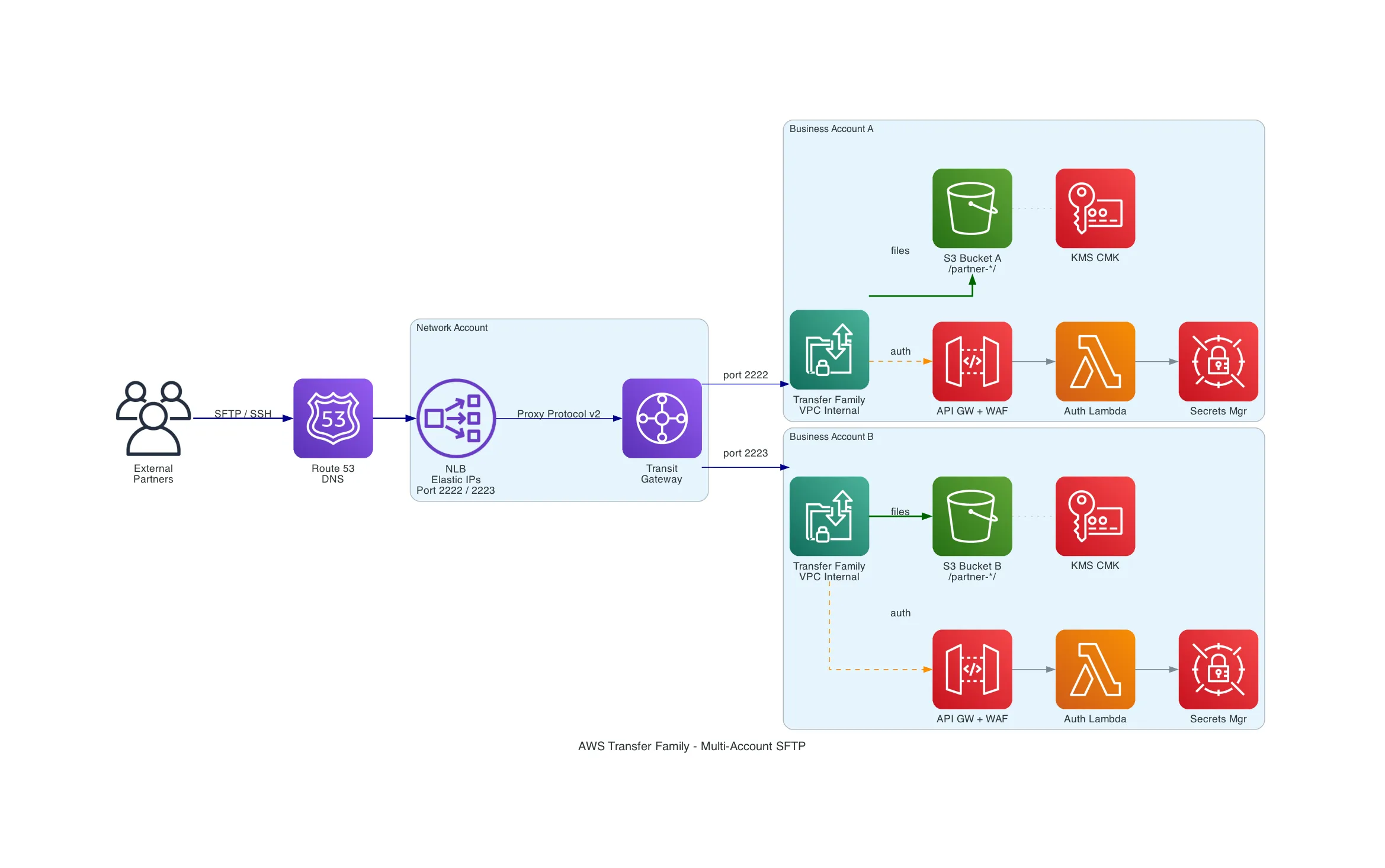
How It Works
Why NLB — Not GWLB, Not VPC Lattice
This was the first design decision. Three AWS networking services can route TCP traffic across accounts, but only one fits.
Gateway Load Balancer is designed for transparent inline appliance inspection — it sends all traffic through virtual appliances (firewalls, IDS/IPS) via GENEVE encapsulation. It doesn’t do port-based routing, doesn’t support Elastic IPs for partner whitelisting, and doesn’t speak Proxy Protocol v2. GWLB would make sense if we were routing through Fortinet, but we explicitly decided against that (more on why below).
VPC Lattice supports TCP resources for cross-account connectivity, but it’s designed for internal service-to-service communication (east-west). It’s not internet-facing, has no Elastic IP support, and no Proxy Protocol v2. The partners are external — VPC Lattice has no role here.
Network Load Balancer operates at Layer 4, supports multiple listeners with port-based routing, Elastic IPs, and Proxy Protocol v2 natively. It’s the only option that checks every box.
| Requirement | NLB | GWLB | VPC Lattice |
|---|---|---|---|
| Internet-facing ingress | Yes | Yes (via appliances) | No |
| Elastic IPs | Yes | No | No |
| Port-based routing | Yes | No | N/A |
| Proxy Protocol v2 | Yes | No (GENEVE) | No |
| Cross-account TCP | Yes (via TGW) | Yes (via appliances) | Yes (native) |
Why Not Route Through Fortinet
The existing security policy mandates all traffic flows through the centralized Fortinet. The instinct is to comply and route SFTP through it. But SFTP runs over SSH (port 22) — the Fortinet cannot inspect encrypted SSH payloads. It can only see:
- Source/destination IP
- Port numbers
- Connection metadata
All of which NLB Security Groups, NACLs, and CloudWatch already handle natively. Routing through Fortinet would add an NLB, TGW data processing costs, and operational complexity — for zero additional security value on encrypted traffic.
The stronger argument: a dedicated SFTP VPC with VPC endpoints and no default internet route is actually a better security posture than routing through Fortinet. There’s literally no outbound internet path to exploit.
Network Architecture — NLB + TGW + Transfer Family
The traffic flow:
External Partner (sftp-biz-a.acme-corp.com:2222)
  → NLB (Network Account, Elastic IPs)
    → Proxy Protocol v2 header added (original source IP)
      → Transit Gateway
        → Transfer Family VPC Endpoint (Business Account A, internal)
          → S3
Port-based routing maps each business unit to a different TCP port on the same NLB:
| Port | Business Unit | Transfer Family Target |
|---|---|---|
| 2222 | Business Account A | TF VPC endpoint ENIs via TGW |
| 2223 | Business Account B | TF VPC endpoint ENIs via TGW |
| 2224 | Business Account C | TF VPC endpoint ENIs via TGW |
All DNS hostnames (sftp-biz-a.acme-corp.com, sftp-biz-b.acme-corp.com) resolve to the same NLB Elastic IPs. Partners differentiate by port number.
Proxy Protocol v2 must be enabled at two points: the NLB target group (proxy_protocol_v2.enabled = true) and Transfer Family (which reads PP v2 headers automatically when traffic arrives through an NLB). After setup, the clientIp field in Transfer Family structured logs shows the real partner IP — not the NLB private IP.
Authentication — Three Options, One Recommendation
SFTP runs inside SSH. Authentication happens during the SSH handshake. Two methods exist at the protocol level:
- SSH Key Pair — partner holds a private key, server holds the public key. Cryptographic challenge-response. Nothing secret crosses the wire.
- Username + Password — partner sends credentials over the encrypted SSH tunnel. Server validates against a credential store.
Transfer Family maps these to three identity provider types:
| Service-Managed | Custom IdP | Directory Service | |
|---|---|---|---|
| Auth methods | SSH keys only | SSH keys and/or password | Password only (AD) |
| Where credentials live | Inside Transfer Family | Secrets Manager, DynamoDB, etc. | AWS Managed AD |
| Custom code needed | None | API Gateway + Lambda | None (but need AD infra) |
| Extra cost | $0 | ~$20/mo | ~$72/mo minimum |
| Best for | Technical partners | Mixed partner base | Existing AD environments |
The recommendation: Custom IdP supporting both SSH keys and password. The Lambda receives whatever the client presents — if it’s a key, validate the key; if it’s a password, check Secrets Manager. Different partners can use different methods on the same server. This allows gradual migration from passwords to SSH keys over time.
Identity-to-IAM-Role Mapping
This is the piece that confused me initially. After authentication, how does a username become S3 permissions?
Transfer Family calls sts:AssumeRole on behalf of the authenticated user. The Lambda auth function returns three things:
- IAM Role ARN — the role Transfer Family assumes
- Home Directory — which S3 prefix the user lands in
- Session Policy (scope-down) — restricts what the role can do for this specific user
The effective permissions are the intersection of the role’s policy and the scope-down policy. Most restrictive wins.
IAM Role Policy (broad):              Scope-Down Policy (narrow):
  Allow s3:* on entire bucket           Allow s3:* on /partner-alpha/* only
                ↓                                      ↓
                └────────── INTERSECTION ──────────────┘
                                 ↓
                  Effective: s3:* on /partner-alpha/* only
The recommended pattern: one shared IAM role for all partners + per-user scope-down policies. The role grants bucket-wide access. The scope-down (returned dynamically by Lambda per user) restricts to their prefix. One role to manage, same isolation.
Multi-Tenant S3 — Folder Structure
Each partner gets a prefix with inbound/ and outbound/ subdirectories:
s3://acme-sftp-bizacct-a/
  |-- partner-alpha/
  |   |-- inbound/     (partner uploads)
  |   |-- outbound/    (company places files for download)
  |-- partner-beta/
      |-- inbound/
      |-- outbound/
Using HomeDirectoryType: LOGICAL, partners see a clean root without knowing the S3 structure:
/            → s3://acme-sftp-bizacct-a/partner-alpha/
/inbound/    → s3://acme-sftp-bizacct-a/partner-alpha/inbound/
/outbound/   → s3://acme-sftp-bizacct-a/partner-alpha/outbound/
One gotcha: ${transfer:HomeBucket} and ${transfer:HomeFolder} variables don’t work with logical directory mappings. Use explicit paths in the scope-down policy or have Lambda generate it dynamically per user.
Security Layering
Seven layers, each with a distinct role:
| Layer | Scope | What It Protects |
|---|---|---|
| NLB Security Groups | NLB | Network access to SFTP ports (partner CIDRs) |
| Transfer Family SGs | TF VPC endpoint | Allow only NLB subnets |
| NACLs | Subnet level | Broad stateless backup |
| WAF | API Gateway (auth only) | Brute-force, geo-blocking, rate limiting |
| IAM Scope-Down | Per-user S3 access | Tenant isolation |
| S3 Bucket Policy | Bucket level | Enforce KMS encryption, restrict to TF role |
| KMS Key Policy | Encryption key | Who can encrypt/decrypt |
WAF protects the authentication API, not SFTP traffic. SFTP runs on port 22 (SSH) — WAF operates on HTTP/HTTPS. If you’re using SSH key-only auth via service-managed users, there’s no API Gateway and no WAF needed at all.
Cost
For a 3-account deployment with 20 partners and 100 GB/month per account:
| Component | Monthly Cost |
|---|---|
| Transfer Family (3 servers) | $657 |
| Auth stack per account (API GW + Lambda + WAF + Secrets Mgr) | $60 |
| S3 + KMS + CloudWatch (3 accounts) | $18 |
| NLB (shared) | ~$16 |
| Transit Gateway (3 attachments + data) | $114 |
| Route 53 | ~$1 |
| Total | ~$863/mo |
TGW attachment cost ($108/mo for 3 accounts at $0.05/hr each) is the biggest fixed cost. If the accounts already have TGW attachments for other workloads, this is shared and shouldn’t be fully attributed to SFTP.
What I Learned
- Fortinet can’t inspect SSH — routing SFTP through a firewall adds complexity for zero security value on encrypted protocols. A VPC with no outbound internet route is stronger than inline firewall inspection.
- NLB is the only option for this pattern — GWLB is for appliance inspection, VPC Lattice is for internal service mesh. Neither supports the combination of internet-facing ingress + Elastic IPs + Proxy Protocol v2 + port-based routing.
- SSH keys simplify everything — service-managed users with SSH keys eliminate the entire API Gateway + Lambda + WAF + Secrets Manager stack. The trade-off is partner onboarding friction (SSH key management vs. familiar username/password).
- Scope-down policies are the real isolation mechanism — one shared IAM role + per-user scope-down policies is simpler and equally secure compared to one role per partner. The intersection model means the scope-down can only restrict, never expand.
- Proxy Protocol v2 is critical but easy to miss — without it, all Transfer Family logs show the NLB private IP instead of the real partner IP. Enable it on both the NLB target group and verify in TF structured logs.
What’s Next
- Build a PoC validating NLB + Proxy Protocol v2 + Transfer Family (internal VPC endpoint) across TGW
- Validate PP v2 source IP preservation specifically across Transit Gateway (the critical unknown)
- Test the Custom IdP Lambda supporting both SSH key and password auth on the same server
- Document the partner onboarding workflow (credential provisioning, IP whitelisting, DNS configuration)
- Evaluate whether per-account NLBs (instead of shared NLB with port routing) simplify operations enough to justify the extra ~$16/mo per account
Related Posts
MPLS vs SD-WAN vs CloudWAN: Enterprise Networking Explained Simply
A visual, jargon-free guide comparing MPLS, SD-WAN, and AWS CloudWAN for enterprise networking — with analogies, comparison tables, and an architecture diagram showing how the three layers connect.
CloudWhen Your Keys Get Locked In: Navigating AWS KMS Import Limitations
AWS KMS doesn't allow key material export by design. When an external PKI partner generates keys but doesn't retain them, you're stuck. Here are the four AWS alternatives — CloudHSM, XKS, Private CA, and fixing the process — with a decision framework to pick the right one.
CloudMigrating 180+ Public Certificates to AWS ACM Exportable Certificates
A practical guide to replacing a third-party CA with ACM exportable public certificates — covering pricing, automation patterns, industry validity changes, and the gotchas nobody mentions.